User tokens
User tokens are used to authenticate API requests to Windmill. Every interaction with the Windmill API requires a Bearer token. Tokens can be scoped to restrict access to specific resources and actions, following the principle of least privilege.
Create a token
You can generate tokens from the Account settings menu. Open it by clicking your username on the side menu, then select "Account settings".
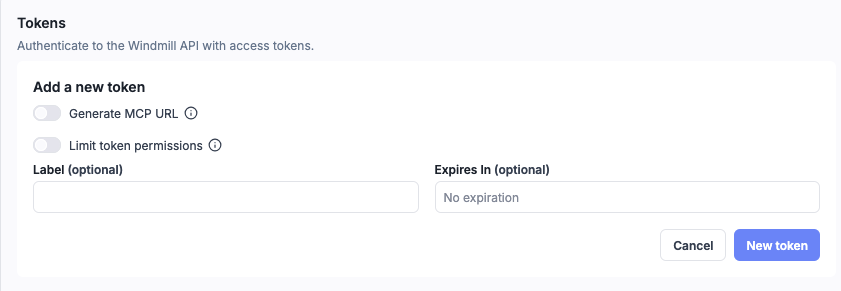
- Enter a label to identify the token (labels help distinguish tokens in the list).
- Optionally set an expiration date.
- Click New token to create a token with full access, or enable Limit token permissions to restrict the token to specific scopes.
You can only see the token once, when it is created. Make sure to store it securely.
Token scopes
By default, tokens inherit the full permissions of the user who created them. By enabling the Limit token permissions toggle, you can restrict a token to only the actions and resources it needs.
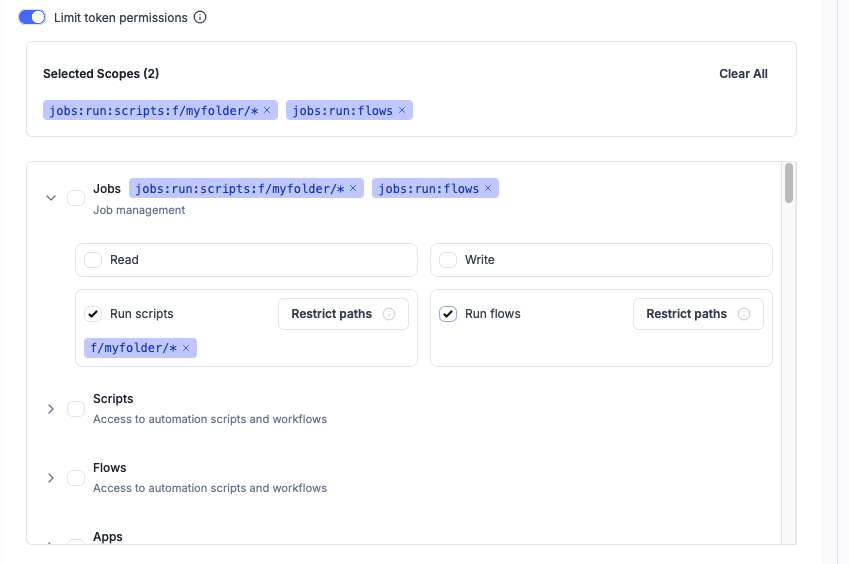
Selected scopes appear as badges at the top of the selector. Each domain (Jobs, Scripts, Flows, etc.) can be expanded to configure Read, Write, or Run permissions. Use the Restrict paths button to limit a scope to specific resource paths.
Scope format
Scopes follow the format:
{domain}:{action}[:{resource_path}]
- domain: the resource category (e.g.
scripts,flows,jobs,resources) - action:
read,write, orrun(for jobs) - resource_path (optional): restrict access to specific paths, with wildcard support
Examples:
| Scope | Description |
|---|---|
scripts:read | Read access to all scripts |
scripts:write:f/production/* | Write access to scripts in the f/production/ folder |
jobs:run:scripts:u/admin/my_script | Run a specific script |
jobs:run:flows | Run any flow |
resources:read:u/user/* | Read resources owned by u/user/ |
A write scope automatically includes read access for the same domain and resource.
Available scope domains
All domains support read and write actions. The Jobs domain additionally supports run:scripts and run:flows.
Domains with path restriction support: scripts, flows, apps, raw_apps, resources, variables, schedules, folders, jobs (for run), and all trigger types (http_triggers, websocket_triggers, kafka_triggers, nats_triggers, mqtt_triggers, sqs_triggers, gcp_triggers, postgres_triggers).
Domains without path restriction: users, groups, workspaces, audit, workers, settings, service_logs, configs, oauth, ai, agent_workers, drafts, favorites, inputs, job_helpers, openapi, capture, concurrency_groups, oidc, acls, indexer, teams, git_sync.
Resource path patterns
For scopes that support it, you can restrict access to specific resource paths using the Restrict paths button in the scope selector. Wildcards are supported:
| Pattern | Matches |
|---|---|
u/admin/my_script | Exact path only |
u/admin/* | All resources under u/admin/ |
f/production/* | All resources in the f/production/ folder |
| (omitted) | All resources in the domain |
Multiple paths can be combined with commas: scripts:read:f/production/*,f/staging/*.
HTTP triggers and tokens
When calling an HTTP trigger with Windmill Auth, the token must have http_triggers:read access to the trigger path. For example, a scoped token calling an HTTP route at my_route needs http_triggers:read:my_route.
When configuring an HTTP trigger with Windmill Auth, you can generate a pre-scoped token directly from the trigger configuration page.
Webhook-specific tokens
Webhooks can generate tokens that are pre-scoped to only trigger a specific script or flow. These tokens cannot impersonate you for any other operation, making them safe to share publicly.
Using tokens
Bearer authentication
Include the token in the Authorization header:
curl -H "Authorization: Bearer <TOKEN>" \
  https://your-windmill-instance.com/api/w/<workspace>/jobs/run/p/<script_path>
Query parameter
Alternatively, pass the token as a query parameter:
https://your-windmill-instance.com/api/w/<workspace>/jobs/run/p/<script_path>?token=<TOKEN>
From scripts
Within Windmill scripts, an ephemeral token for the current job is available as the WM_TOKEN environment variable. It can be used to call the Windmill API directly, for example to fetch variables or resources. The TypeScript, Python, and Rust client libraries load it automatically, so you typically don't need to handle it yourself.
Managing tokens
From the Account settings page, you can view all your tokens with their labels, scopes, and expiration dates. Tokens can be revoked at any time by deleting them from the list.
CLI token creation
You can also create tokens using the Windmill CLI:
wmill user create-token